Chapter 6: Working with lists#
All programming languages have the feature of organizing data in efficient ways. In a previous article you learned quite a lot about the string data type. Strings can contain lots of information, but they are not usually chosen as a way of organizing tabular like data.
There is a popular data type to manage related data, which is the list data type. This is very useful if you need to store a list of names for a birthday reunion, or a list of products your company offers, a list of bar code numbers, etc.
In this article you will learn how to create and work with Python lists in different ways. You have learned about lists in a previous article, but here you will learn a lot more.
Python lists#
To define a list in Python use square brackets: []. Inside the square brackets, place the different values you want to store, separated with commas. For example, say you want to create a list with the numbers 1, 2, 3, 4 and 5:
>>> numbers = [1, 2, 3, 4, 5]
>>> numbers
[1, 2, 3, 4, 5]
In the example I included a space after each comma. This is not strictly necessary, but it improves readability. Check the type of the variable numbers:
>>> type(numbers)
<class 'list'>
As you can see, the type of the variable numbers is list. In this example you used integer values to create a list. You can use another data type for the list elements, such as floats or strings:
>>> floats = [1.1, 3.14, 2.71, 5.0]
>>> floats
[1.1, 3.14, 2.71, 5.0]
>>> strings = ['hello', 'world', 'bye']
>>> strings
['hello', 'world', 'bye']
The cool thing about lists is that the elements don’t need to be of the same type. You can mix different data types in the same list:
>>> mixed_list = [1, 'hello', 3.14, 2+3j]
>>> mixed_list
[1, 'hello', 3.14, (2+3j)]
Lists can be constructed using previously defined variables:
>>> my_name = 'John'
>>> names = ['Jane', my_name, 'Carol', 'Lucas']
>>> names
['Jane', 'John', 'Carol', 'Lucas']
You can also work with empty lists. For that, just write a set of empty square brackets:
>>> empty_list = []
>>> empty_list
[]
What is the length of a list?#
The length of a list is the number of elements it contains. It can be obtained with the len() function, similar to how the length of a string is computed. For example, the length of the list ['John', 'Jane', 'Kevin'] should be 3, since it contains three elements (three strings in this case):
>>> names = ['John', 'Jane', 'Kevin']
>>> len(names)
3
In the particular case that the list has no elements, that is the list is empty, the length is 0:
>>> empty_list = []
>>> len(empty_list)
0
List index notation#
You can access different elements of a Python list by using the index notation. In order to access a specific element in a list, write the name of the variable containing the list followed by square brackets [], and inside the square brackets goes the index of the element you want to access. Remember that in Python indexe values start at 0, as you learned in the strings chapter.
For example, the list ['John', 'Jane', 'Kevin'] has three elements. The first one is at index position 0, the second at index 1, and the third at index 2.
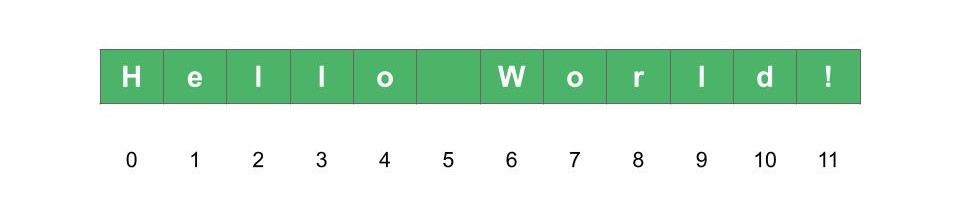
Fig. 13 Positive index in lists#
Let’s access each element of the list of names using index notation:
>>> names = ['John', 'Jane', 'Kevin']
>>> names[0]
'John'
>>> names[1]
'Jane'
>>> names[2]
'Kevin'
List index can be negative. Negative indexes start at -1 for the last element in the list, -2 for the previous to last, and so on.
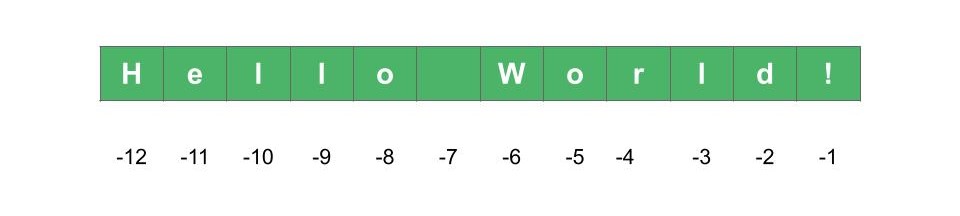
Fig. 14 Negative index in lists#
If you try to access an index that is not valid, Python will throw an error:
>>> names = ['John', 'Jane', 'Kevin']
>>> names[3]
Traceback (most recent call last):
  File "<stdin>", line 1, in <module>
IndexError: list index out of range
>>> names[-4]
Traceback (most recent call last):
  File "<stdin>", line 1, in <module>
IndexError: list index out of range
Python list slice notation#
Imagine you have a large list of items and you need to retrieve a specific subset of them. For example, each item may correspond to the mean price of BTC of each day on a given week. In the following example the list prices has seven elements, each one being a number corresponding to the price of each day of the week:
>>> prices = [16500, 16550, 16600, 16650, 16700, 16750, 16800]
The first item at index position 0 corresponds to the price on Sunday, second item at index position 1 is the price on Monday, and so on. Say you want to extract the prices ranging from Monday through Friday. Then you need to go from index 1 up to index 5, inclusive. For this you can use the square bracket index slice notation with two integer numbers separated by a colon:
>>> prices[start:stop]
The first integer number start is the starting index, which is included, and the second number stop is the stopping index which is not included. The result will be a new list ranging from start through stop-1. The number of items in the resulting list is the difference stop-start.
For the current example you have to use 1 and 6 for the starting and stopping positions, both separated by a colon:
>>> prices = [16500, 16550, 16600, 16650, 16700, 16750, 16800]
>>> prices[1:6]
[16550, 16600, 16650, 16700, 16750]
The start and stop indices can be left blank. The default value for the start index is 0, while the default for the stop is the length of the list minus one (which corresponds to the last element).
>>> prices = [16500, 16550, 16600, 16650, 16700, 16750, 16800]
>>> prices[:5]
[16500, 16550, 16600, 16650, 16700]
>>> prices[3:]
[16650, 16700, 16750, 16800]
A third parameter can be used in slice notation, which is the step. The step parameter is also an integer number, and indicates how many elements should the resulting list skip from the starting position. For example, you may want to start from the second element (index 1) all the way to the previous to last (index 5) and skipping one element on each step. Thi way the step parameter should be 2, while the start and stop parameters are 1 and 6 (remember the stop parameter is not included, that’s why it should be 6, and not 5).
>>> prices = [16500, 16550, 16600, 16650, 16700, 16750, 16800]
>>> prices[1:6:2]
[16550, 16650, 16750]
Lists can contain other lists#
Remember that the list data type can contain elements with mixed data types. The same list can contain integer numbers, floats, and even strings. As you may remember from a previous article of this course, there is a great number of data types Python has to offer. Lists can contain any of those data types as its elements.
One very useful technique that is often used among developers is to place lists inside other lists. This can be handy in many situations, for example if you need to store information in table format. Let’s work on an example where only one of the elements of the list is another list.
>>> student = ['Jonh', 23, [73, 49, 94]]
>>> student
['Jonh', 23, [73, 49, 94]]
In this example you have a list containing a first element indicating the name of a student (a string), a second element being the age of the student (an integer) and a third element which can be a list of scores on a given course. Let’s check the type of the student variable:
>>> type(student)
<class 'list'>
As expected, the variable student is of type list. Now let’s check the length of this variable. What do you expect to be the length? Is it 3? Or should you also count the number of elements of the inner list? In the latter case the total length should be 5, since you have the name, the age, and the three notes.
>>> len(student)
3
As you can see, the length returns only 3. The inner list is counted as only one element for the outer list. You can check the length of the inner list by accessing it with index notation and calling len():
>>> len(student[2])
3
This way you are only returning the length of the inner list. What happens if you call len() on the other elements?
>>> len(student[0])
4
>>> len(student[1])
Traceback (most recent call last):
  File "<stdin>", line 1, in <module>
TypeError: object of type 'int' has no len()
The length of the first element is 4, since the string 'John' has four characters. But the length of the second element throws an error, since the length of an integer is not defined.
Finally, let’s see how you can access the elements of the inner list. The inner list is at index position 2, so you have to start writing the name of the variable student followed by the index 2 inside square brackets. Next, each element of the inner list also have indexes, in this case 0, 1 and 2. Add the corresponding index inside square brackets after the previous statement. You will end up with something like student[inner_list_index][element_index]:
>>> student = ['Jonh', 23, [73, 49, 94]]
>>> student[2][0]
73
>>> student[2][1]
49
>>> student[2][2]
94
In cases where more lists are inside other lists, you can use multiple square bracket notation to access inner elements like in this example.
List of lists. In this section you learned that lists can contain other lists. In the case that all the elements of a list are also other lists, it is said that you have a list of lists. For example, a list of lists can look like
[[1, 2, 3], [4, 5, 6], [7, 8, 9]]. This is one of the ways to organize data that comes in table like format.
Python lists are mutable#
Each of the elements of a list can be changed for another value. Let’s go back to the student example and modify the name of the student.
The name of the student (string) is at index position 0. To change its value, write the name of the variable student followed by the index between square brackets. Let’s assign the value 'Oliver' to the first element of that list:
>>> student = ['Jonh', 23, [73, 49, 94]]
>>> student[0] = 'Oliver'
>>> student
['Oliver', 23, [73, 49, 94]]
As you can see, the list itself has changed (mutated) after the re-assignment. You can also try to edit the second score, which is the second item inside the inner list. That is, first index is 2 (the position of the inner list) and the second index is 1 (the second position inside the inner list):
>>> student[2][1] = 88
>>> student
['Oliver', 23, [73, 88, 94]]
You can also add and remove elements from a list. For this you have to make use of methods and functions. You will learn about those in later tutorials.
Python Lists vs Strings#
Python lists are very similar to strings. They are both sequences of data. While a string can only contain a sequence of characters, lists can contain any type of data as its elements, even another list.
You can convert a string into a list by using the list() function:
>>> text = 'hello world'
>>> type(text)
<class 'str'>
>>> list_type = list(text)
>>> list_type
['h', 'e', 'l', 'l', 'o', ' ', 'w', 'o', 'r', 'l', 'd']
>>> type(list_type)
<class 'list'>
You could try to convert a list into a string, but is not so easy. We will cover such techniques in later chapters of the course.
A big difference between lists and strings is that the elements of a list can be changed (the list is mutable), while a string is immutable.
Conclusion#
In this article you learned some of the basics of a very important data type: lists. You learned how to create a list, which elements can be stored in a list, how to extract information from a list using index and slice notation and how to compute the length of a given list. You have also learned how to mutate a list, that is, how to change the values of certain elements by assigning new values using index notation.
There is a lot more you can do with Python lists, such as remove items, add new items, construct a list in a programmatic way using loops, sort its values, and more. You will learn these techniques and more in later tutorials.
Exercises#
After you read the article on lists, you can practice what you have learned with the following exercises. Let’s get to work!
In your own words, what is a list? What is the difference between a list and a string? What are their similarities?
Create a list of places you want to visit, for example countries or cities. Start with the ones you want to visit the most, so the list is ordered from best to worse in that sense. Save the list in a variable. Check the type of your variable.
How many elements are on your list? Check your answer with the
len()function, which computes the length of a list.Retrieve the first element of the list, that is, the place you want to visit the most. Use the square bracket index notation to do this.
Repeat the exercise #4 for the last element of the list.
Make use of the square bracket slice index notation to retrieve the three most wanted places to visit.
Given the list
numbers = [1, 2, 3, [4, 5, 6, [7, 8, 9, [10]]], 11], how would you access each of the numbers it contains? For example, to obtain the number 1 you would donumbers[0], for the number 2numbers[1], and so on.Try to convert a list of characters to a string. For example, your list can look something like
['h', 'e', 'l', 'l', 'o']. To convert the list to a string, use thestr()function. What happened? Did it throw an error. If not, is the result what you expected?